I can’t stress enough the importance of having a code convention in place before starting in any kind of software project.
What’s a code convention?
A code convention it’s about a team of developers agreeing on a standard  way to statically structure the code that will be part of the system they are building together. Note that it doesn’t cover any aspect of the software design, (coupling, cohesion, dependency management and so on) but rather focuses exclusively on how the body of the code is organized.
You may wonder, how is this valuable? Well, a convention has one primary goal that goes beyond plain esthetic: to improve the code readability by achieving consistency. Following a common standard will make it easier for the members of a team to work on each other’s code without the burden of having to mentally adjust to different coding styles.
Style matters
A code convention apply to all kinds of programming elements such as declarations, expressions and statements and it usually covers different aspects. Here is a non-exclusive list of what could be described in a coding standard:
- Naming (casing, use of prefixes/suffixes)
- Ordering (where different members are defined in the context of a class)
- Comments (where they should be placed and how they should be formatted)
- Spacing (between various syntactic elements such as punctuation)
Now, making a group of developers agree on how they should format their code on such a level of detail isn’t the easiest thing in the world. We all see programming code as a way of express our minds, and that includes also how many spaces there are between the parenthesis in a method call and the list of arguments.
Verbal agreement is not enough
Even if you do succeed in finding a middle ground that makes everybody happy (or sort of), you still need to make sure that the team will stick to what has been agreed on, without relying on tedious manual code review. Luckily there are tools out there that can automatically check code against a predefined coding convention. 
One of them is StyleCop, a tool internally used by many teams at Microsoft, which has been repackaged and made freely available to the public under the Shared Source license.
The package contains a set of code format rules and a command-line program that checks all the source code files in a Visual Studio project against them and provides a compliance report. The rules that are included out-of-the-box are the lowest common denominator among different verbally defined coding standard used by many teams at Microsoft who are developing on the .NET platform using C#.
Here is a brief overview of StyleCop’s features:
- Can only check C# code (support for other languages may be added in the future)
- It integrates with Visual Studio and MSBuild, which makes it possible to run validations on demand from the IDE or as part of a build.
- The set of rules to include can be controlled with a configuration file
- Includes a graphic configuration editor (called StyleCopSettingsEditor)
- It offers an SDK that allows to extend it by adding custom rules written as .NET classes
As mentioned, StyleCop includes a Visual Studio add-on, which allows to run it at any point in time against the currently opened project from a menu item.
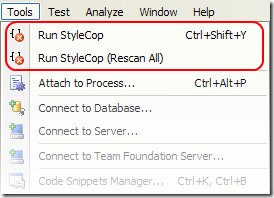
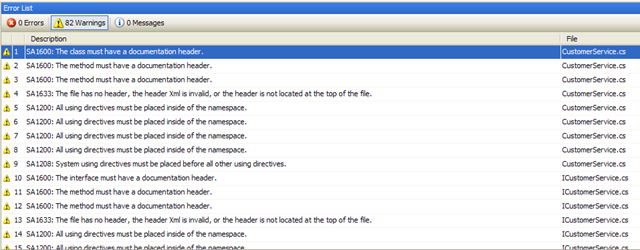
By default the results of the validation are reported back to the user as warnings, but you have the option to have them show up as errors, if you care enough about consistency that is.
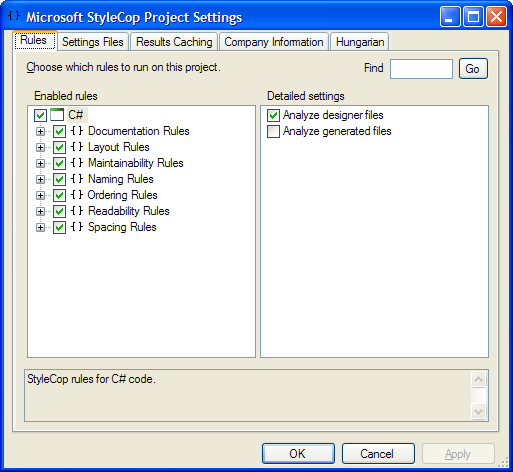
Configuration can be controlled via a Settings.StyleCop file, which is easily edited with the accompanying GUI editor.
StyleCop can also be run through a set of MSBuild tasks. All you have to do is include the target file that invoke the proper tasks in your custom build definition or Visual Studio project file:
<Import
    Project="C:\Program Files\MSBuild\Microsoft\StyleCop\v4.3\Microsoft.StyleCop.targets" />
Resources
You can download the latest version of StyleCop from MSDN including documentation and samples. If you need more information, here you can find a good tutorial on how to successfully integrate StyleCop in your .NET project As of July 29, 2014 the tutorial is no longer available online.
/Enrico